Batchy for sound design
Process whole SFX libraries at once.
Every variation, named.
Build a branching graph from built-in DSP and your VST3 or AU plugins. Audition each branch live, then render a separately named file per branch for every sound in the folder.
7-day free trial · Email required · No payment required
 (enlarge)
Enlarge screenshot
The example
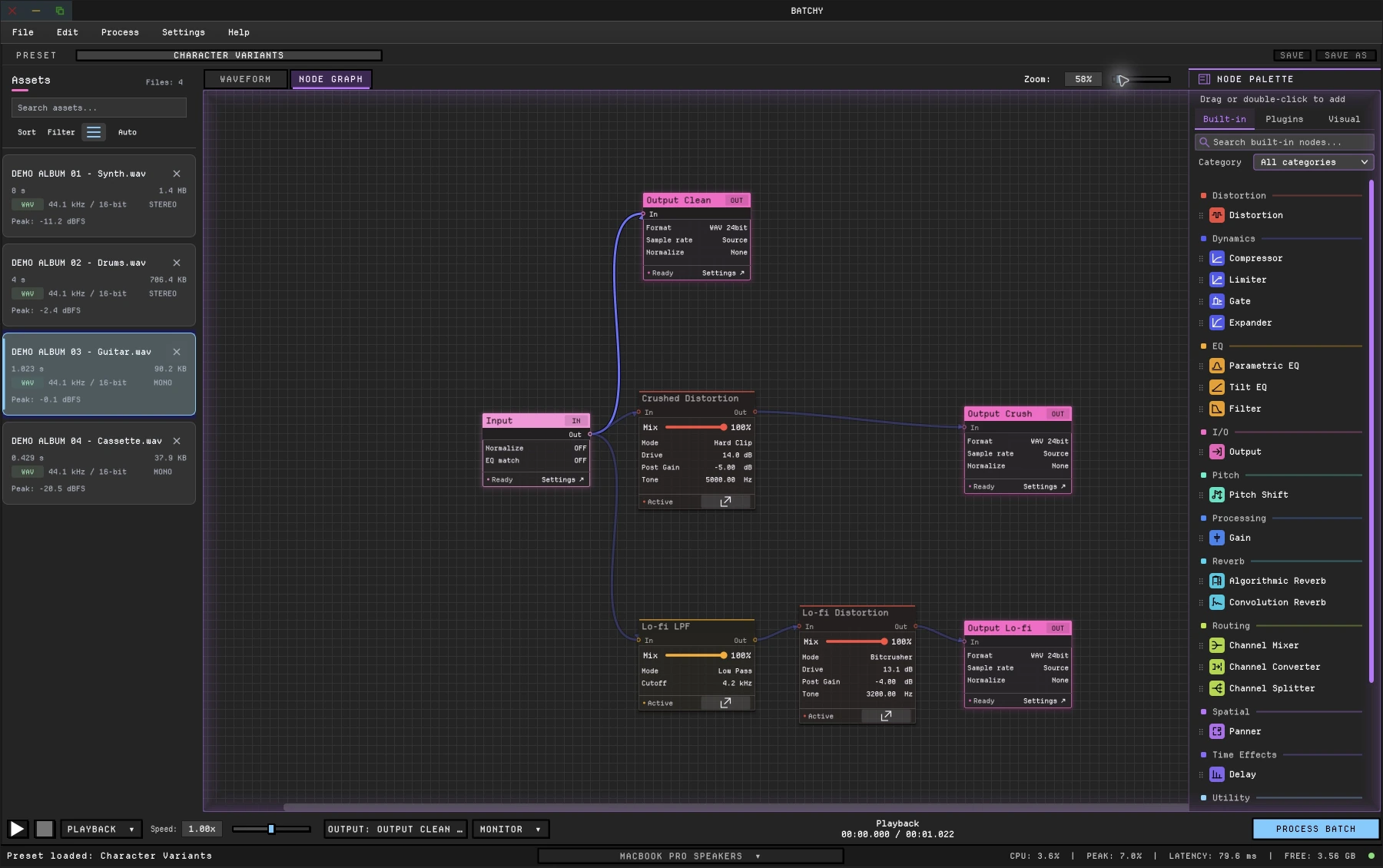
One impact. Three named variations. The whole library.
The graph in the screenshot, run as a batch: every file in the folder renders through all three branches.
metal_impact_01.wavEvery file in the folder- Straight through, as a referenceClean Output
metal_impact_01_clean.wavWAV · 24-bit · source rate - DistortionHard clip · drive 5×Crush Output
metal_impact_01_crush.wavWAV · 24-bit · source rate - Filter EQLow-pass 4.2 kHzDistortionBitcrusherLo-fi Output
metal_impact_01_lofi.wavWAV · 24-bit · source rate
Build · Audition · Render
How it works.
- 01 Build
Branch and blend.
Split the source into parallel paths with Distortion, Pitch Shift, Filter, Convolution Reverb or your own plugins. Blend paths in a Channel Mixer, or end each one in its own output.
- 02 Audition
Hear every branch.
Play any file in the library through the graph. Switch between the live signal and the processed result before you commit.
- 03 Render
Render the library.
Name each output once with a filename template. Batchy renders every branch for every file, each with its own format and bit depth.
Why it fits
A node graph, not scripting.
- Visual, reusable graphsBuild the processing on a canvas. Save it as a preset and reopen it for the next library.
- Your plugins in the batchVST3 on macOS and Windows, AU on macOS, alongside built-in DSP.
- Pitch, character and spacePitch Shift, Distortion with clipping, folding and bitcrushing, Convolution and Algorithmic Reverb, Delay.
- A command line when you need itRun the same preset headless for very large renders or a pipeline.
Specifications
- Plugins
- VST3 on macOS and Windows; AU on macOS
- Built in
- 30+ audio, metering and visual graph nodes
- Loudness
- LUFS (EBU R128), RMS or peak targets; −1 dBTP true-peak safety on LUFS and RMS; TPDF dither
- Formats
- WAV, AIFF, FLAC, MP3 and OGG
- Resolution
- 22.05, 44.1, 48, 88.2, 96 and 192 kHz; 16, 24 or 32-bit float
- Channels
- Stereo through 7.1.4 surround panning; mono, stereo and surround conversion
- Automation
- Command line and headless rendering with JSON render reports
- Systems
- macOS 12+ (Intel and Apple Silicon); Windows 10/11 (64-bit)
This is one workflow. See the whole toolkit.
Batchy also covers music mastering, game audio and podcasts, with 30+ audio, metering and visual graph nodes, plugin hosting, loudness delivery and the command line.
Everything in one license
$149 once
One-time purchase, not a subscription.
- Built-in DSP, plugin hosting and batch rendering
- Loudness targets and the command line
- macOS + Windows · two machines
- All 1.x updates included
- 30-day money-back guarantee
Secure checkout · License key emailed instantly
Download 7-day free trialBefore you buy.
Can one source produce several processed versions?
Yes. Route it through separate branches, each ending in its own output with its own name, format and settings. Every file in the batch gets every version.
Do I need to write scripts?
No. The graph replaces the script. If you do automate, the same preset runs from the command line.
Can I use my existing plugins?
Compatible VST3 plugins on macOS and Windows, plus AU on macOS. Third-party plugins are separately licensed.
Is there a free trial?
Yes. Download Batchy and select Start 7-day free trial on the welcome screen or in Manage License. Email required to start; no payment required. Downloading does not start the trial. A paid license is required after seven days.
Will it run on my computer?
macOS 12+ on Intel or Apple Silicon, or Windows 10/11 (64-bit). One license covers two machines, on either platform.