Batchy for music mastering
Master a whole album at once. LUFS-matched and true-peak safe.
Build one mastering chain from Batchy’s EQ, compression and limiting plus your own plugins. Audition it on every track, then render the album to every deliverable in one batch job, each with its own loudness target, format and bit depth.
7-day free trial · Email required · No payment required
Route, bypass and blend effects. Then render the batch.
The example
One mastering chain. Every track. Three deliverables.
Every mix in the album folder renders to all three outputs. The vinyl pre-master branches off before the limiter, so it keeps its headroom.
03_night_drive_mix.wavAlbum folder- Master Limiter Dynamics→ −14 LUFS targetStreaming master Output
03_night_drive_master.wavWAV · 24-bit · −14 LUFS · −1 dBTP - From the Master Limiter; kept at the source rateFLAC archive Output
03_night_drive_archive.flacFLAC · 24-bit · source rate - Branched before the limiter; no normalizationVinyl pre-master Output
03_night_drive_vinyl.wavWAV · 24-bit · source rate
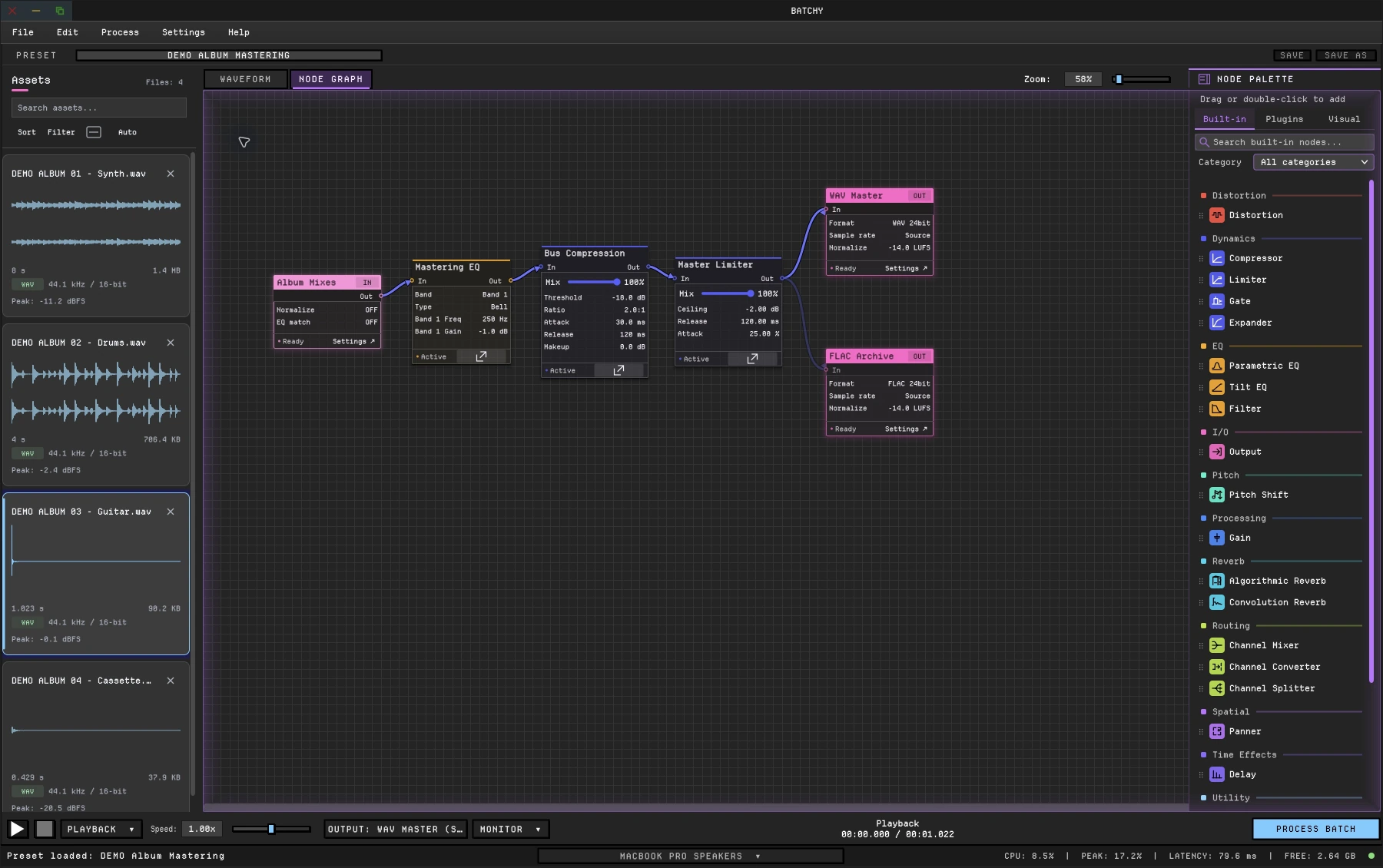 (enlarge)
Enlarge screenshot
Build · Audition · Render
How it works.
- 01 Build
Build the mastering chain.
Connect Parametric EQ, Compressor and Limiter, or your own mastering plugins. The Input node’s EQ Match can match a reference file’s tonal curve.
- 02 Audition
Check every track.
Switch between live and processed playback. Read peak and RMS on the Level Meter, and LUFS in the waveform view, before you render.
- 03 Render
Deliver the album.
Each output sets its own LUFS target, sample rate, bit depth and dither. One batch job renders every track to every output.
Delivery
Loudness you can deliver to spec.
- EBU R128 measurementLUFS targets use ITU-R BS.1770-4 / EBU R128 integrated loudness with gating.
- True-peak safetyLUFS and RMS targets finish with a true-peak safety stage at −1 dBTP.
- Dither at the final depthTPDF dither is applied once, at the final write depth, so a batch never double-dithers.
- Up to 192 kHz22.05, 44.1, 48, 88.2, 96 or 192 kHz at 16, 24 or 32-bit float, in WAV, AIFF, FLAC, MP3 or OGG.
Specifications
- Plugins
- VST3 on macOS and Windows; AU on macOS
- Built in
- 30+ audio, metering and visual graph nodes
- Loudness
- LUFS (EBU R128), RMS or peak targets; −1 dBTP true-peak safety on LUFS and RMS; TPDF dither
- Formats
- WAV, AIFF, FLAC, MP3 and OGG
- Resolution
- 22.05, 44.1, 48, 88.2, 96 and 192 kHz; 16, 24 or 32-bit float
- Channels
- Stereo through 7.1.4 surround panning; mono, stereo and surround conversion
- Automation
- Command line and headless rendering with JSON render reports
- Systems
- macOS 12+ (Intel and Apple Silicon); Windows 10/11 (64-bit)
This is one workflow. See the whole toolkit.
Batchy also covers sound design, game audio and podcasts, with 30+ audio, metering and visual graph nodes, plugin hosting, loudness delivery and the command line.
Everything in one license
$149 once
One-time purchase, not a subscription.
- Built-in DSP, plugin hosting and batch rendering
- Loudness targets and the command line
- macOS + Windows · two machines
- All 1.x updates included
- 30-day money-back guarantee
Secure checkout · License key emailed instantly
Download 7-day free trialBefore you buy.
Will every track come out at the same loudness?
Only if you ask for it. Loudness targets are set per output: normalize the streaming master to a LUFS target, and leave normalization off on a pre-master to keep the album’s relative levels.
How does Batchy fit alongside my DAW?
Export your mixes from your DAW, then build and audition a mastering chain in Batchy and render the album with your loudness targets and delivery settings.
Can Batchy separate stems or create an instrumental?
No. Supply stems and instrumentals from your DAW; Batchy processes and delivers them.
Can I use my existing plugins?
Compatible VST3 plugins on macOS and Windows, plus AU on macOS. Third-party plugins are separately licensed.
Is there a free trial?
Yes. Download Batchy and select Start 7-day free trial on the welcome screen or in Manage License. Email required to start; no payment required. Downloading does not start the trial. A paid license is required after seven days.
Will it run on my computer?
macOS 12+ on Intel or Apple Silicon, or Windows 10/11 (64-bit). One license covers two machines, on either platform.